Category | DevOps
Last Updated On 12/06/2026
Manual server configuration rarely fails in obvious ways. Instead, it fails quietly. One server has a slightly different package version. Another environment uses a different configuration file. Over time, these small inconsistencies turn into deployment failures, outages, or security gaps. That’s exactly the problem Chef software was built to solve.
In DevOps environments where applications scale across dozens or hundreds of servers, infrastructure needs to behave consistently. Chef software helps teams automate server configuration and manage infrastructure using code instead of manual scripts.
In DevOps automation workshops delivered to infrastructure teams, configuration drift appears quickly when servers are managed manually. Introducing Chef automation often stabilizes environment consistency within the first deployment cycle.
This guide explains what is Chef in devops, how Chef software architecture works, and how organizations use automation to manage infrastructure, compliance, and deployments more efficiently.
| Area |
Summary |
|---|---|
Tool Purpose |
Chef software automates infrastructure configuration using Infrastructure as Code |
Architecture |
Uses Chef Server, Chef Client, Workstation, and Nodes |
Automation |
Enables CI/CD workflows and hybrid infrastructure management |
Compliance |
Supports compliance-as-code using Chef InSpec |
Monitoring |
Provides Chef automation monitoring and analytics through Chef Automate |
Automation platforms like Chef software are becoming increasingly important. The global DevOps automation market is projected to reach $14.44 billion by 2026, showing how strongly organizations are investing in infrastructure automation.
Many organizations start exploring automation when managing infrastructure becomes difficult to scale. As the number of servers grows, maintaining a consistent configuration manually becomes almost impossible.
This is where configuration management tools come in.
What Is Chef in DevOps?
Simply put
Chef is a configuration management platform that automates infrastructure setup, configuration, and maintenance using Infrastructure as Code (IaC).
Instead of configuring systems manually, teams define infrastructure behavior in code.
That code is then automatically applied across all servers. Using Chef software, organizations can ensure that:
Core Concepts of Chef
The chef uses several key components that make automation possible.
1. Recipes
Recipes contain instructions written in Chef’s Ruby-based DSL. They define how a system should be configured.
Examples include:
2. Cookbooks
Cookbooks are collections of recipes along with configuration files and templates. They act as reusable infrastructure modules.
For example:
A web server cookbook might include recipes for:
3. Nodes
Nodes are the machines managed by Chef. These can include:
Each node regularly checks with the Chef server to receive updated configuration instructions. Through these components, Chef software converts infrastructure management into programmable workflows.
Evolution of Chef Software
Chef has been a well-known automation platform in DevOps for years.
In 2026, Chef Software was acquired by Progress, creating a broader DevOps automation ecosystem.
This evolution strengthened the capabilities of Chef software, integrating automation, compliance, and infrastructure management into one platform.
Understanding Chef software architecture helps explain how automation works behind the scenes.
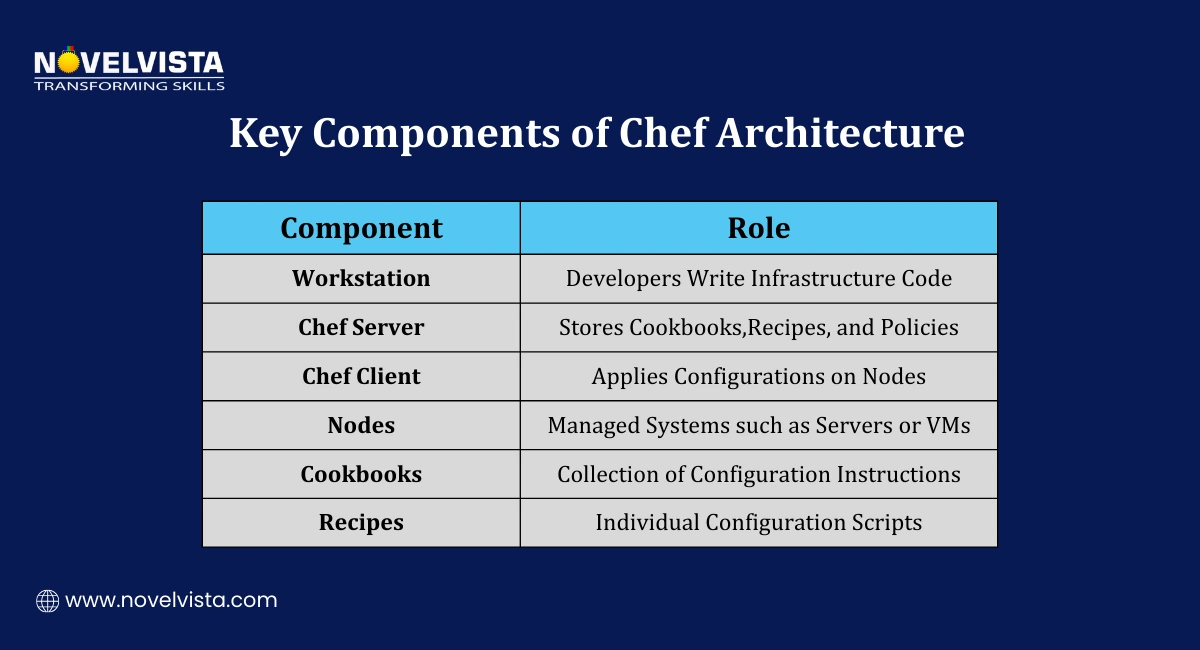
Chef follows an agent-based architecture, where servers periodically receive configuration updates from a central system.
Key Components of Chef Architecture
Chef infrastructure includes four main components.
1. Chef Server
The Chef Server acts as the central hub of the system. It stores:
When nodes request configuration updates, the Chef Server compiles and delivers the appropriate instructions. The central management model makes Chef software highly scalable.
2. Chef Client (Agent)
Chef Client runs on each managed node. Its responsibilities include:
Chef Clients typically run every 30 minutes, ensuring nodes remain aligned with the desired configuration state.
3. Workstation
The workstation is where developers write and test infrastructure code. Typical activities include:
The workstation acts as the development environment for Chef software automation.
4. Nodes
Nodes are the systems where configuration changes are applied. These can include:
Chef clients running on nodes apply the configuration defined in cookbooks.
Chef Architecture Workflow
The workflow of Chef software automation usually follows this process.
This automation workflow ensures infrastructure remains consistent. Chef architecture supports major cloud platforms, including:
In enterprise DevOps implementations reviewed during training programs, the pull-based Chef client model is often preferred because it allows thousands of nodes to remain synchronized without centralized execution bottlenecks.
This flexibility allows Chef software to operate across hybrid infrastructure environments.
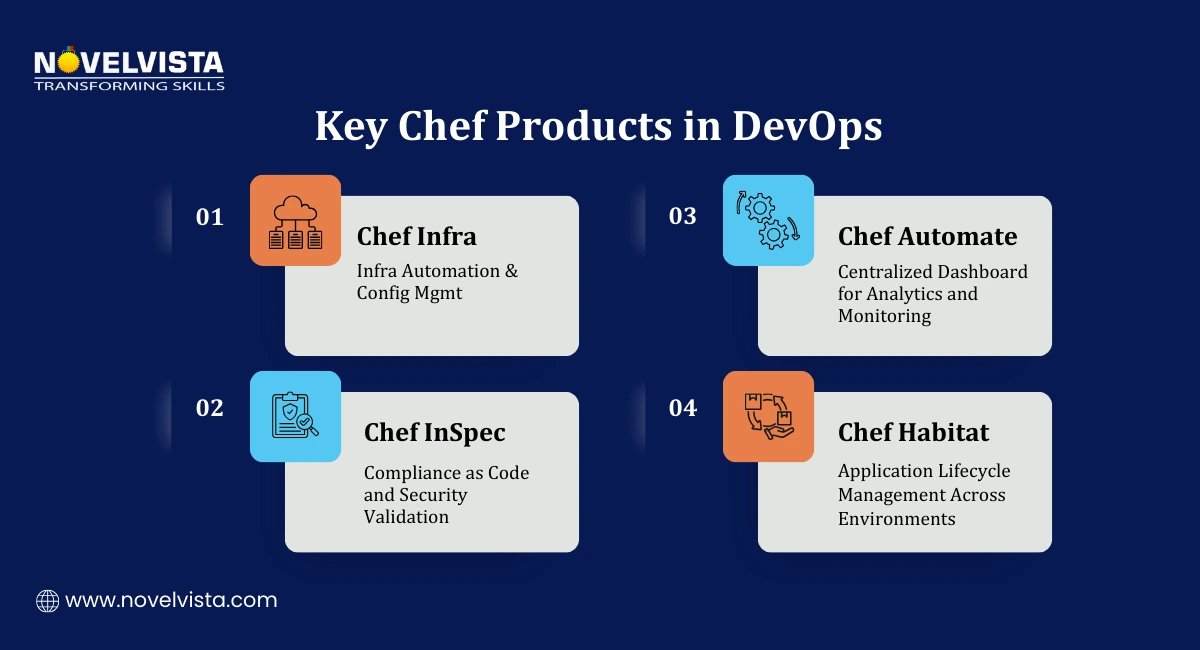
Over time, Chef expanded its platform to include multiple tools supporting infrastructure automation and compliance.
These tools work together to provide full DevOps automation capabilities.
Chef Infra
Chef Infra is the core configuration management engine. It enables teams to define infrastructure as code and enforce desired configurations across servers.
Organizations using Chef Infra report:
Studies show up to 60% improvement in infrastructure team efficiency after adopting Chef software automation.
Chef InSpec
Security compliance is another important part of DevOps operations. Chef InSpec allows teams to implement compliance-as-code.
It enables automated auditing against security standards such as:
By integrating compliance checks into infrastructure automation, Chef software helps organizations maintain secure systems.
Chef Automate
Chef Automate provides a centralized management platform for infrastructure automation. This platform includes a Chef automation dashboard that gives teams visibility into automation workflows.
Key features include:
The Chef automation dashboard allows teams to track infrastructure status across environments.
Organizations using Chef Automate report 81% improvement in application release speed.
Chef Habitat
Chef Habitat focuses on application lifecycle management. It ensures applications behave consistently across environments.
Key capabilities include:
Together, these features strengthen the overall capabilities of Chef software.
Once the architecture and core components are in place, the real value of Chef software appears through automation. DevOps teams use Chef to automate infrastructure provisioning, configuration management, and deployment workflows.
Automation reduces manual work, improves consistency, and helps teams deploy applications faster. This is where Chef automation integration becomes an important part of modern DevOps pipelines.
CI/CD Integration with DevOps Pipelines
Infrastructure automation is most effective when integrated into the CI/CD pipeline. Chef software works with many common DevOps platforms to support automated deployments.
Common tools used for Chef automation integration include:
Jenkins
GitLab CI/CD
GitHub Actions
Azure DevOps
These integrations allow infrastructure updates to occur automatically during deployment workflows.
For example:
Developers push application code to a Git repository
A CI/CD pipeline triggers build and test stages
Infrastructure updates are applied through Chef automation integration
Applications are deployed to configured environments
In CI/CD training environments, integrating Chef with Jenkins pipelines often becomes the first step toward automated infrastructure delivery, allowing configuration updates to deploy alongside application releases.
Hybrid Infrastructure Automation
Many organizations operate a mix of environments such as on-premise infrastructure, public cloud, and edge systems.
Chef software supports hybrid automation across these environments. Typical environments managed through Chef include:
On-premise data centers
AWS and other public cloud platforms
Private cloud environments
Edge computing systems
This flexibility allows organizations to use Chef software for infrastructure automation regardless of where workloads run.
Studies show organizations implementing Chef automation report 62% fewer configuration errors, demonstrating the reliability of automated configuration management.
Security and Policy Automation
Security controls are increasingly integrated into DevOps workflows. Chef supports policy-as-code, allowing security policies to be defined programmatically.
This approach enables teams to automate:
Security configuration checks
Compliance validation
Infrastructure policy enforcement
For example:
A Chef policy can ensure that:
Servers use approved operating system versions
Security patches are installed automatically
Encryption settings remain enabled
This automated governance approach helps organizations maintain consistent Chef software deployments across environments.
Understand Chef architecture, automation workflows, and how infrastructure as
code helps manage servers, configurations, and deployments across modern DevOps environments.
Automation is not just about deploying infrastructure. DevOps teams also need visibility into performance, reliability, and operational efficiency.
Chef provides several tools that support Chef automation monitoring, analytics, and operational insights
Chef Automation Performance
Infrastructure automation can significantly improve deployment speed and operational efficiency. Organizations implementing Chef software automation have reported measurable improvements.
Common Chef automation performance improvements include:
Some organizations report up to 45% reduction in infrastructure storage costs through optimized infrastructure automation. (Source: Chef)
These improvements demonstrate the operational value of Chef software in large DevOps environments.
Chef Automation Metrics
To measure DevOps performance, teams rely on operational data and automation insights. Chef provides built-in tools that track Chef automation metrics, such as:
Tracking Chef automation metrics helps teams understand how infrastructure automation affects overall DevOps performance.
These insights are often aligned with DORA metrics, which measure:
Organizations using Chef analytics report 61% more efficient deployments thanks to improved visibility. (Source: Chef)
Chef Automation Monitoring
Maintaining infrastructure health requires constant visibility. Chef Automate includes monitoring capabilities that support Chef automation monitoring across environments.
The Chef automation dashboard provides a centralized view of infrastructure status. Key Chef automation monitoring capabilities include:
The Chef automation dashboard helps DevOps teams quickly identify configuration problems or security issues.
During DevOps operations training, teams rely on Chef Automate dashboards to quickly identify nodes that drift from expected configuration states, allowing issues to be corrected before deployments are affected.
Organizations adopting Chef software automation often see significant improvements in operational efficiency.
Automation helps reduce manual work while improving infrastructure consistency.
Several studies highlight the real impact of Chef software in enterprise environments.
Key Performance Improvements
Organizations using Chef automation report:
81% faster application release cycles
62% reduction in configuration errors
Improved infrastructure reliability
(Source: Chef)
Automation reduces the risk of configuration drift, which is a common issue in large environments.
Cost Savings and Efficiency
Automation also provides financial benefits. Enterprises implementing Chef software report cost savings due to reduced manual management and improved operational efficiency.
Some large organizations report up to $3 million in infrastructure management savings after adopting Chef automation. These improvements demonstrate how Chef automation performance can directly influence business outcomes.
Enterprise-Scale Infrastructure Automation
One reason Chef software remains popular in large organizations is its scalability. Chef environments can manage:
Thousands of servers
Hybrid cloud infrastructure
Large enterprise application environments
Automation allows infrastructure teams to maintain consistent environments across development, testing, and production.
This scalability makes Chef software suitable for large DevOps environments.
Infrastructure automation has become essential for modern DevOps environments. Managing servers manually is no longer practical when applications run across multiple cloud platforms and environments.
Chef software helps organizations automate infrastructure management through Infrastructure as Code, policy enforcement, and centralized monitoring.
Across multiple DevOps certification training cohorts, organizations adopting configuration management tools like Chef typically report noticeable improvements in deployment consistency within the first few automation cycles.
By combining configuration automation, compliance tools, analytics, and the Chef automation dashboard, Chef allows teams to maintain consistent and reliable infrastructure.
As the DevOps automation market continues to grow toward $14.44 billion by 2026, platforms like Chef software will remain essential for organizations looking to improve operational efficiency and infrastructure reliability.

Next Step: Build Practical DevOps Automation Skills
If you want to understand how tools like Chef software fit into modern DevOps workflows, NovelVista’s DevOps Foundation Certification Training can help you build the right skills. The course covers DevOps principles, automation tools, CI/CD pipelines, and infrastructure management practices used by modern teams. Through hands-on learning and real-world examples, professionals gain the knowledge needed to implement automation and improve software delivery processes.
Author Details

Course Related To This blog
Certified DevOps Developer
Certified DevOps Architect
Confused About Certification?
Get Free Consultation Call
Stay ahead of the curve by tapping into the latest emerging trends and transforming your subscription into a powerful resource. Maximize every feature, unlock exclusive benefits, and ensure you're always one step ahead in your journey to success.