Category | Project Management
Last Updated On 20/08/2026
Projects don’t fail because teams don’t work hard. They fail because work is scattered, priorities are unclear, and progress isn’t visible. That’s why project management tools have moved from being “nice to have” to absolutely essential in 2026.
Across project management training sessions, we consistently see teams struggling not because tools are missing, but because the chosen tool does not match how work actually flows.
This guide breaks down how modern tools are actually used today, what types exist, where each one fits best, and how real teams choose tools that help them deliver work on time without constant follow-ups or confusion.
TL;DR – What Really Matters in 2026
| Area | Reality on the Ground |
| Tool choice | One size never fits all teams |
| Core value | Visibility, collaboration, and control |
| Team fit | Marketing, dev, PMOs all need different tools |
| Trend | From task tracking to portfolio-level insight |
| Outcome | Better decisions, fewer surprises |
At a basic level, project management tools are software platforms used to plan, execute, track, and close projects. But in 2026, their role is much bigger than simple task lists. Also, In real project environments, teams rarely use a single methodology, which is why tool category matters more than brand selection.
Modern tools help teams:
The best tools today balance simplicity with depth. They support daily task execution while also giving leaders a clear view of progress, delays, and workload.
Popular tools like Asana, Trello, Jira, and Monday.com dominate team-level work. At the same time, growing organizations increasingly depend on project portfolio management tools such as Celoxis and Microsoft Project to manage multiple initiatives together.
Not every team works the same way. That’s why project management tools are best understood by category, not brand. Each type solves a different problem.
These tools focus on visual task flow and simplicity.
Common characteristics:
Examples include Asana and Trello.
These tools work best for:
They are easy to use, but not ideal for complex dependencies or long-term forecasting.
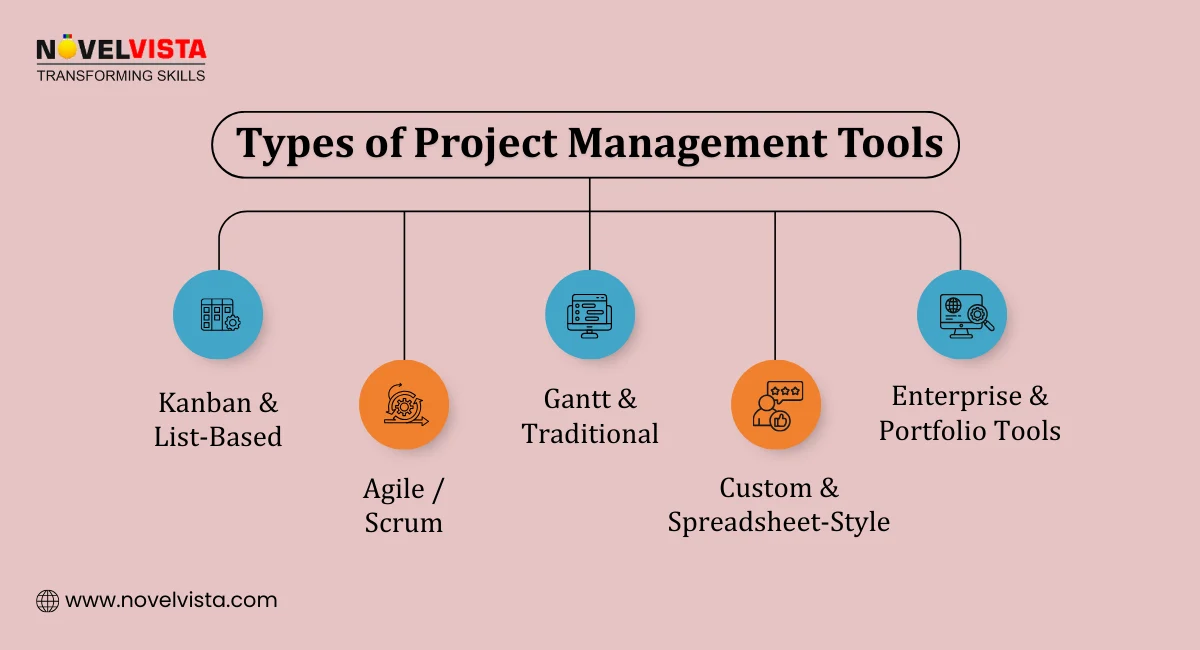
Agile tools are built specifically for iterative delivery.
Typical features include:
Jira is the most widely used example and remains one of the most trusted software project management tools in 2026.
These tools are commonly chosen as tools for software development because they align well with Scrum, Kanban, and hybrid agile models. They are powerful, but often require training and discipline to use correctly.
These tools focus on timelines, dependencies, and scheduling.
Key strengths:
Examples include Microsoft Project and ProjectManager.
Such project management tools are widely used in:
They work well where planning accuracy matters more than flexibility.
These tools blend structure with flexibility.
Common capabilities:
Examples include Monday.com, ClickUp, and Smartsheet.
Many teams consider these the best software tools for cross-functional work because they adapt easily to different teams without forcing a single methodology.
When organizations manage dozens of projects, task tools aren’t enough.
Project portfolio management tools focus on:
Tools like Wrike and Celoxis are built for PMOs and senior management. These tools help leaders answer hard questions about priority, risk, and resource conflicts.
Expert Platform Comparison
Built to Scale Faster
Save Hours of Research
Feature depth only adds value when teams know how to interpret and act on the data those features produce. While tools differ by category, the best tools in 2026 share a common feature set. These features help teams move faster without losing control.
Most modern project management tools support:
For example, ClickUp is known for offering a wide range of views, which helps teams with mixed working styles.
Good tools reduce meetings by keeping work conversations close to tasks:
This is essential when teams are remote or cross-functional.
Automation removes manual follow-ups:
Advanced platforms like Wrike also offer AI-driven insights that flag risks and delays early.
Some tools go beyond tasks:
Tools that combine time, cost, and progress data reduce reporting bias and improve forecasting accuracy over time. Tools like Paymo and Zoho Projects are popular where billing, utilization, or forecasting matter.
Here’s how commonly used tools fit into real-world scenarios:
| Tool | Best For | Key Use Case | Pricing Start |
| Asana | Non-technical teams | Task tracking and workflow automation | $10.99/user/month |
| Trello | Small teams | Simple Kanban boards | Free tier |
| Jira | Agile teams | Sprints and issue tracking | $8.60/user/month |
| Monday.com | Custom workflows | Cross-team planning | Varies |
| Wrike | Enterprise teams | Proofing and advanced reporting | Custom |
| ClickUp | Flexibility | All-in-one work management | Free tier |
| Smartsheet | Spreadsheet users | Data-driven tracking | Per user |
| Celoxis | PMOs | Resource and portfolio planning | Custom |
The right tool depends on how your team works, not on feature count.
Team Size
Delivery Method
Specific Needs
Teams that select tools based on workflow clarity rather than feature volume experience faster adoption and fewer process workarounds. Choosing wisely reduces friction and improves adoption.
Several trends are shaping how project management tools evolve:
More AI support for forecasting and risk alerts
Stronger customization and automation
Better free tiers for startups
Growing convergence between task tools and portfolio-level reporting
The line between team tools and project portfolio management tools continues to blur.
To see how artificial intelligence is reshaping planning, forecasting, and delivery, read our in-depth blog on AI in Project Management and its real-world impact on modern teams.
No project management tool replaces sound planning, stakeholder engagement, or risk awareness; tools only amplify existing practices.
The best project management tools in 2026 are not the most complex ones. They are the tools that match how teams plan, execute, and report work. From simple Kanban boards to enterprise-grade project portfolio management tools, the right choice improves clarity, accountability, and delivery outcomes, without adding overhead.
Tools help manage work, but strong project outcomes still depend on skilled leadership. NovelVista’s Project Management Professional (PMP) Certification Training helps professionals master planning, execution, risk control, and stakeholder communication. The program connects real-world project scenarios with proven frameworks, making it ideal for those who want to lead projects confidently, no matter which tools their teams use.
Start by assessing your team size and workflow complexity. Select a tool with the right features and an easy-to-use interface to encourage adoption across your department.
Although most modern platforms are user-friendly, initial training helps teams use features consistently, avoid data silos, and get the most from automation capabilities.
Most leading platforms support native CSV and Excel imports, while many also integrate directly with competing tools, making data migration faster, smoother, and easier.
Free plans work well for small teams and simple task management, while growing organizations often require paid plans for advanced reporting, stronger security, and sophisticated automation.
Leading project management software can integrate with popular tools such as Slack, Google Workspace, and Zoom. These integrations centralize communication and minimize the need to switch between multiple browser tabs.
Author Details

Course Related To This blog
PMP Training Certification
Confused About Certification?
Get Free Consultation Call
Stay ahead of the curve by tapping into the latest emerging trends and transforming your subscription into a powerful resource. Maximize every feature, unlock exclusive benefits, and ensure you're always one step ahead in your journey to success.