Category | DevOps
Last Updated On 13/08/2026

You push code. Your teammate pushes code. Someone else creates a branch, someone merges the wrong thing, and suddenly no one knows what's going on. Sound familiar?
Managing code across a growing team is messier than it looks. You need a place where everyone's work lives together, reviews happen without chaos, and deployments don't feel like a gamble.
That's exactly where what is Bitbucket becomes a real question worth answering. Bitbucket is a Git-based code hosting and collaboration platform built by Atlassian. It gives your team one central place to store code, review pull requests, automate builds, and connect everything to your project management tools.
In this article, we'll cover what Bitbucket does, how its server option works, what the pipeline feature offers, how pricing breaks down, and how it stacks up against GitHub, so you can decide if it's the right fit for your team.
| Topic | Key Takeaway |
| What is Bitbucket | A Git-based platform by Atlassian for code hosting, reviews, and CI/CD |
| Bitbucket Server | Self-hosted, on-premises version for enterprises needing full data control |
| Bitbucket Pipeline | Built-in CI/CD tool using YAML config; free plan includes 50 mins/month |
| Bitbucket Pricing | Free (up to 5 users), Standard (~$3.30/user), Premium (~$6.60/user) |
| GitHub vs Bitbucket | GitHub wins for open source; Bitbucket wins for Jira teams and private repos |
| Reliability | 5 incidents in the last 90 days; 327 total outages logged since 2020 |
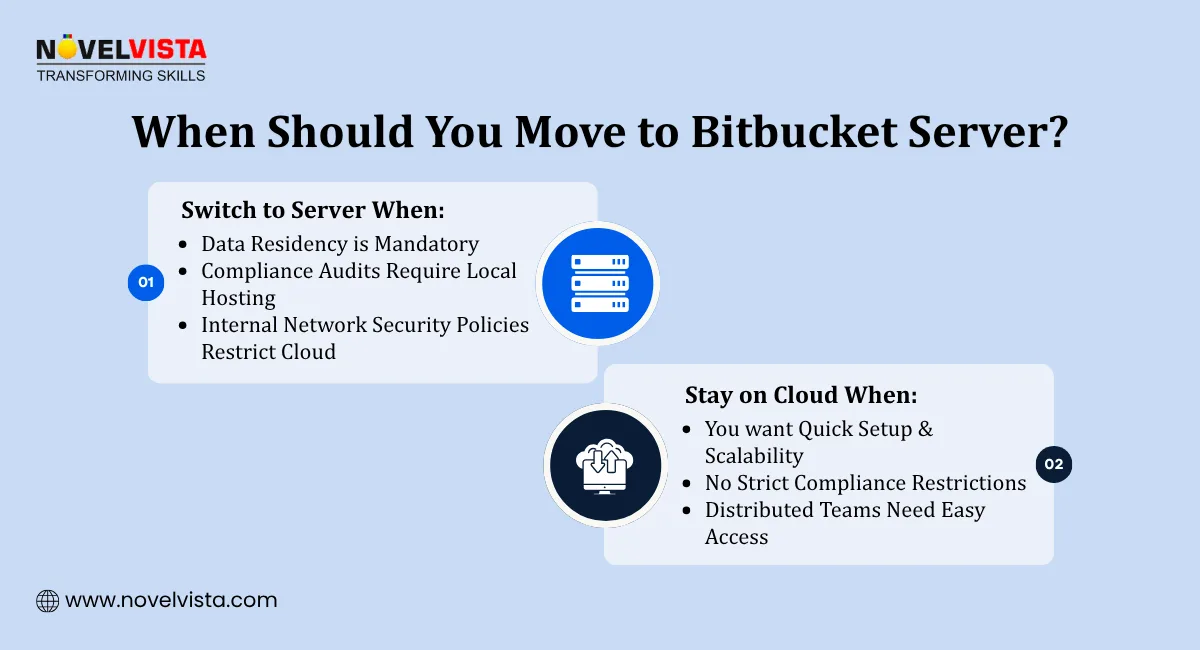
Most teams start with the cloud version of Bitbucket, and that works great for a long time. But some teams, especially larger enterprises, can't put their source code on someone else's servers. That's where Bitbucket Server comes in.
So, what is Bitbucket Server? It's the self-hosted, on-premises version of Bitbucket (previously called Stash) that lets your team run the entire platform on your own infrastructure. You get the same web-based UI for code reviews, merges, and repository management, just without relying on Atlassian's cloud.
Bitbucket Server is the right call when:
According to 2026 PeerSpot Mindshare data, Bitbucket Server holds an 14.0% mindshare in version control tools, which tells you it's not just a niche option. A solid chunk of enterprise teams actively rely on it. (Source: PeerSpot)
In enterprise DevOps workshops, teams with audit controls typically shortlist self-hosted repositories within 30 days when source-code residency is mandatory.
If you don't have those kinds of restrictions, the cloud version will serve you just fine. But for teams where data sovereignty isn't optional, Bitbucket Server is built exactly for that need.
Now that the server question is out of the way, let's talk about what is Bitbucket used for in practical, everyday terms, because it does more than just store code.
Here's a quick breakdown of the core features:
Across delivery teams we train, pull request standards reduce rework when reviewers check branching rules, ticket linkage, and rollback readiness together.
Over 10 million registered users rely on Bitbucket, including 60 Fortune 100 companies. So the use cases are well-tested across teams of all sizes.
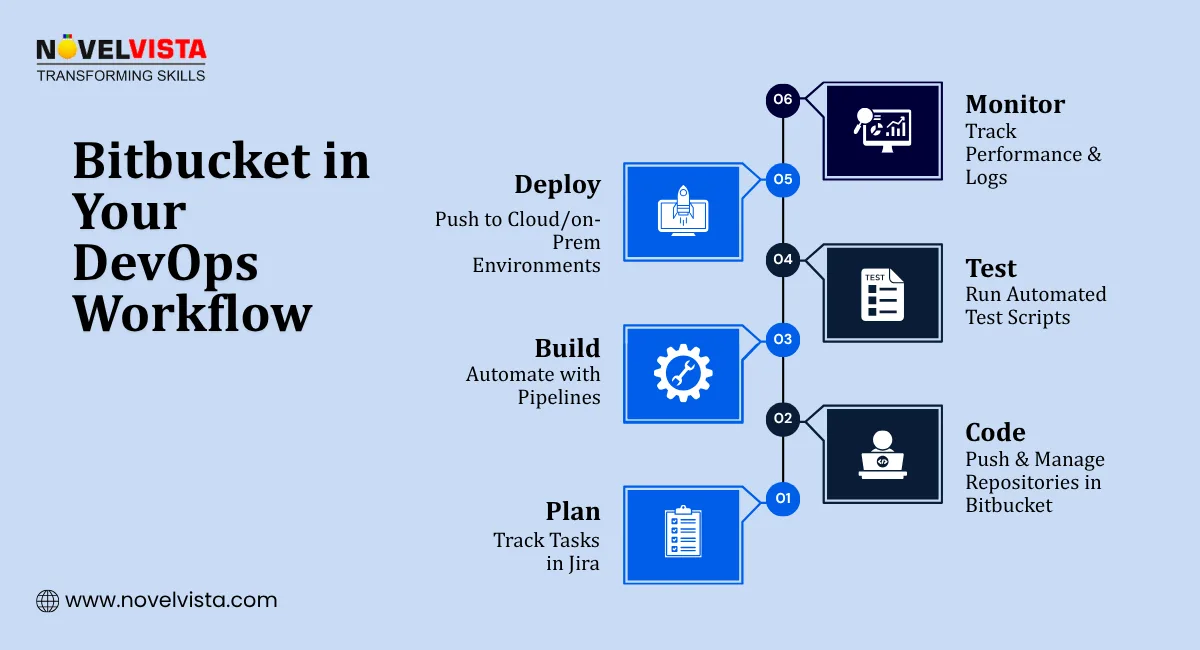
One of the most useful things about Bitbucket is that you don't need a separate CI/CD tool to get started. Bitbucket Pipeline is built right in, and it's genuinely simple to set up.
Here's how it works: you add a bitbucket-pipelines.yml file to your repository, define your build steps, and every time someone pushes code or opens a pull request, the pipeline runs automatically. No external Jenkins server, no complicated integrations to maintain.
A few things that make Bitbucket Pipeline worth using:
The free plan gives you 50 build minutes per month, which is enough to test the feature. The Standard plan bumps that to 2,500 minutes, plenty for a team with regular deployments.
In CI/CD training labs, we recommend starting with the test and lint stages first, then adding deployment gates once stability is proven.
Following a playwright tutorial can help teams understand where automated UI testing fits within a modern CI/CD pipeline.
Bitbucket Pipeline is one of those features that saves a surprising amount of time once you start using it. Instead of managing a separate CI tool, everything lives in the same place as your code.
Speaking of what's included at each plan level, that's exactly what we'll look at next.
Let's talk money, because Bitbucket pricing is one of the areas where it genuinely competes well, especially for smaller teams and growing companies.
There are three plans:
A simple way to think about Bitbucket pricing:
Plan | Price | Users | Pipeline Minutes |
| Free | $0 | Up to 5 | 50/month |
| Standard | ~$3.30/user | Unlimited | 2,500/month |
| Premium | ~$6.60/user | Unlimited | 3,500/month |
The Free plan works well for side projects or small teams testing the waters. Standard is the sweet spot for most teams. Premium makes sense when your company needs tighter security controls or you're running heavy CI/CD workloads.
One thing worth noting about Bitbucket pricing, the per-user cost is lower than many competitors, and enterprise-grade features like IP whitelisting come included in Premium rather than being sold as separate add-ons. That's a meaningful difference when you're budgeting for a larger team.
In budgeting consultations, growing teams usually compare license cost against admin time saved through integrated repositories and automation tooling.
This is the question most teams eventually ask. And the honest answer is, it depends on what your team already uses and what you actually need.
Let's break down the GitHub vs Bitbucket comparison clearly:
| Feature | GitHub | Bitbucket |
| Free Pipeline/Actions Minutes | 2,000/month | 50/month |
| Mid-Tier Price (per user) | ~$4 | ~$3.30 |
| Jira Integration | Limited | Native two-way |
| Enterprise Features | $49/user add-ons | Included in Premium |
| Open Source Community | Very strong | Smaller |
GitHub is the better choice if:
Bitbucket is the better choice if:
Here's something that might surprise you in the GitHub vs Bitbucket conversation. Bitbucket actually holds a 14.5% mindshare compared to GitHub's 10.7% in 2026 PeerSpot data. That's not what most people expect to hear, but it reflects just how widely Bitbucket is used across enterprise environments.
The GitHub vs Bitbucket decision really comes down to one thing: if Jira is at the center of how your team manages work, Bitbucket is the more natural fit. If you're focused on open-source contributions or community-driven projects, GitHub has the edge.
Master CI/CD pipelines, automation & modern DevOps practices
Learn tools like Bitbucket, Docker & cloud workflows
Build job-ready skills for high-demand DevOps rolesadd content here
No platform is perfect, and it's fair to ask about reliability before committing to a tool your whole team depends on.
Here's what the data shows: over the last 90 days, Bitbucket recorded 5 incidents, including 1 major one, with a median resolution time of 2 hours and 50 minutes. Since 2020, a total of 327 outages have been logged, which works out to roughly 4.5 incidents per month on average. (Source: Isdown)
The most common pain point isn't the repositories going down; it's Bitbucket Pipeline disruptions. Build queues stalling or pipelines failing to trigger are the issues teams report most often during outages.
The good news is that Atlassian maintains an official Bitbucket status page where you can check real-time service health. Bookmarking it is a small habit that saves a lot of confusion when something feels off.
For most teams, the uptime is solid enough that it won't be a blocker. But if your deployments are time-sensitive or you're running a high-frequency release cycle, it's worth having a backup plan for those occasional disruptions.
If your team needs private repositories, a tight Jira connection, and built-in CI/CD without managing a separate tool, Bitbucket delivers all of that at a price that makes sense.
For enterprises that can't move to the cloud, Bitbucket Server gives you the same core experience on your own infrastructure. For smaller teams, the free plan is a genuine starting point. And as your team grows, the Standard and Premium plans scale with you without surprise costs.
It's not the flashiest tool in the DevOps space, but it's one of the most practical ones. Especially if you're already living inside the Atlassian ecosystem.
If you want to go deeper on DevOps practices, CI/CD workflows, and modern software delivery, NovelVista's certification courses are a solid next step to build those skills hands-on.

If this article got you thinking about CI/CD, pipelines, and modern software delivery, that's a good sign you're ready to go deeper.
NovelVista's DevOps Foundation Certification Training gives you a structured, hands-on path to understanding DevOps principles, tools, and practices that teams actually use on the job. Including everything around code management, automation, and continuous delivery.
It's a great next step, whether you're just starting out or looking to formalize what you already know.
Explore the DevOps Foundation Certification Training at NovelVista
Author Details

Course Related To This blog
DevOps Practitioner Certification
Confused About Certification?
Get Free Consultation Call
Stay ahead of the curve by tapping into the latest emerging trends and transforming your subscription into a powerful resource. Maximize every feature, unlock exclusive benefits, and ensure you're always one step ahead in your journey to success.