Category | AI And ML
Last Updated On 02/07/2026
Artificial intelligence has moved beyond simple chatbots. Today, enterprises are building AI assistants that can access internal documents, interact with business applications, execute workflows, and retrieve real-time information. According to recent industry reports, more than 70% of enterprises are actively investing in generative AI initiatives, yet one of the biggest challenges remains connecting AI models securely to enterprise systems.
This is exactly where the Model Context Protocol (MCP) comes in.
If you've been wondering how to build MCP server for your organization, you're not alone. Many developers ask questions like:
This guide answers all of these questions while walking you through how to build MCP server step by step. Whether you're building your first AI integration or preparing an enterprise-ready deployment, understanding the right architecture and implementation strategy will save significant development time and reduce security risks.
Before learning how to build MCP server, it's important to understand what it actually does.
An MCP Server acts as a bridge between AI models and external resources. Instead of giving an AI direct access to databases, APIs, or internal systems, the server exposes controlled tools and resources through the Model Context Protocol.
This creates a standardized communication layer that enables different AI models to interact with enterprise systems in a secure and predictable manner.
Challenge | How MCP Solves It |
Multiple AI integrations | One standardized protocol for all AI assistants |
Security concerns | Controlled access to enterprise resources |
Custom API development | Reusable tool interfaces |
Vendor lock-in | Works across multiple LLM providers |
Scalability | Modular architecture for future expansion |
The biggest advantage is interoperability. A properly designed server can work with multiple AI applications without requiring major code changes.
The first step in how to build MCP server is understanding the overall Model Context Protocol architecture.
A production deployment typically includes four primary components:
Component | Purpose |
AI Client | Claude Desktop, ChatGPT, IDEs, or AI agents |
MCP Server | Exposes tools and resources |
Enterprise Services | APIs, databases, cloud services |
Authentication Layer | Identity, permissions, and access control |
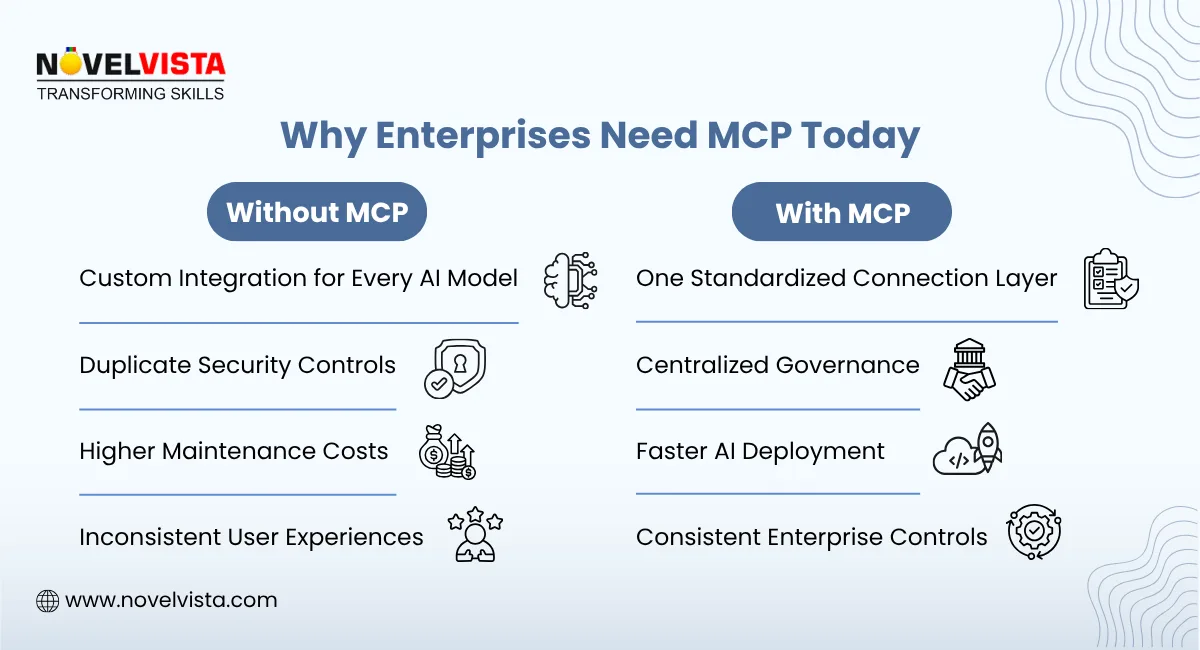
The AI client never communicates directly with enterprise systems. Every request passes through the MCP server, making governance and auditing much easier.
This layered architecture is one of the primary reasons enterprises are rapidly adopting MCP.
The next decision is selecting the development language.
The two most popular options are MCP server Python and MCP server TypeScript.
Python is an excellent choice when your organization already uses Python for AI, machine learning, or backend services.
Advantages include:
Python is often preferred for internal AI applications and data-heavy enterprise environments.
If your backend infrastructure relies heavily on JavaScript or Node.js, MCP server TypeScript may be the better option.
Benefits include:
Both languages are fully capable of supporting enterprise-scale deployments.
Once you've selected the technology, it's time to define the tools your server will expose.
Examples include:
A common mistake when learning how to build MCP server is exposing too many tools immediately.
Instead, begin with a small number of well-defined, secure tools that solve high-value business problems.
Each tool should have:
Keeping tools focused makes them easier to maintain and scale.
Security should never be treated as an afterthought.
A production MCP server should include:
Because AI models can initiate requests on behalf of users, every action should be traceable.
Many enterprise teams also implement approval workflows before allowing AI to execute sensitive operations.
This approach significantly reduces operational risks.
One of the strengths of MCP is compatibility across AI platforms.
For example, MCP server Claude enables Claude Desktop to discover available enterprise tools automatically.
Similarly, MCP server ChatGPT integrations allow AI assistants to securely interact with approved enterprise resources through standardized interfaces.
Rather than creating separate integrations for every model, organizations can maintain one server that supports multiple AI ecosystems.
This reduces maintenance costs while improving consistency across applications.
Testing is one of the most overlooked steps when organizations build MCP server solutions.
A comprehensive testing strategy should include:
Test Type | Purpose |
Functional Testing | Verify tool execution |
Security Testing | Validate permissions |
Load Testing | Measure scalability |
Error Testing | Check failure handling |
Integration Testing | Verify external systems |
Testing should simulate real enterprise workloads rather than simple development scenarios.
Logging should also capture:
These insights help optimize performance after deployment.
Even experienced development teams encounter challenges during implementation.
Some of the most common mistakes include:
Avoiding these issues early makes future maintenance much easier.
Remember that an MCP server is enterprise infrastructure—not just another API project.
Organizations planning long-term AI adoption should follow several best practices.
Start Small
Launch with a limited number of business-critical tools before expanding.
Use Modular Design
Separate authentication, business logic, and integrations into independent modules.
Monitor Everything
Track usage metrics, failures, and latency.
Version Your APIs
Avoid breaking existing AI integrations during updates.
Document Every Tool
Well-documented tools improve adoption and reduce support requirements.
These practices help create a scalable foundation for future AI initiatives.
Learning how to build MCP server is becoming an essential skill for enterprise AI teams. As organizations deploy increasingly capable AI assistants, standardized protocols are replacing custom integrations. If you are looking to upskill your team, you can check out NovelVista’s Model Context Protocol (MCP) Deep Dive.
Whether you choose MCP server Python for its AI ecosystem or MCP server TypeScript for modern web development, the core principles remain the same: design secure tools, implement strong authentication, follow a scalable Model Context Protocol architecture, and thoroughly test before production.
Perhaps the greatest advantage is interoperability. A well-designed server can support both MCP server Claude and MCP server ChatGPT, allowing enterprises to integrate multiple AI models without rebuilding backend infrastructure.
As AI adoption continues to accelerate, investing in a production-ready MCP server today provides the flexibility, security, and scalability needed for tomorrow's enterprise applications.
Author Details

Course Related To This blog
Model Context Protocol (MCP) Deep Dive
Confused About Certification?
Get Free Consultation Call
Stay ahead of the curve by tapping into the latest emerging trends and transforming your subscription into a powerful resource. Maximize every feature, unlock exclusive benefits, and ensure you're always one step ahead in your journey to success.