Category | AI And ML
Last Updated On 02/06/2026
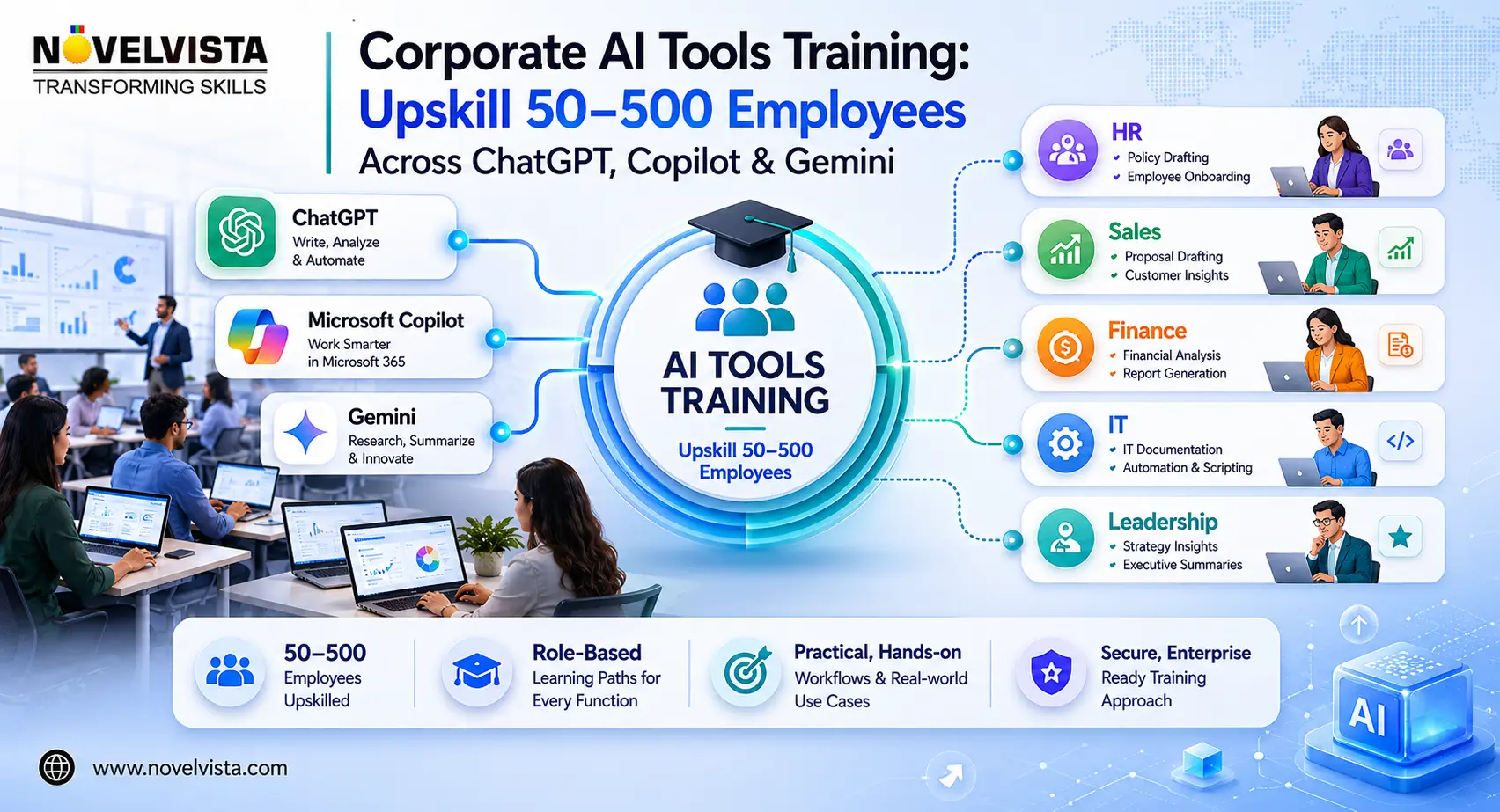
Corporate AI tools training is now a practical workforce priority for organisations that want employees to use ChatGPT, Microsoft Copilot, and Gemini safely, consistently, and productively. This blog explains what a scalable programme should include, how to train 50–500 employees, how to design role-based learning paths, how to manage AI governance, and how to measure adoption after training.
For L&D leaders, HR teams, IT heads, and business managers, the challenge is no longer whether AI tools are useful. The real challenge is building repeatable capability across departments without exposing sensitive data or creating inconsistent usage habits.
Corporate AI tools training matters because employees are already experimenting with generative AI in daily work. Some use ChatGPT for drafting and research. Others use Copilot inside Microsoft 365. Google Workspace teams may use Gemini for email, documents, and analysis.
Without structured guidance, this adoption becomes fragmented. One team may save hours each week, while another may avoid AI completely. One employee may use AI responsibly, while another may paste confidential information into an unapproved tool.
A well-designed corporate AI tools training programme helps organisations standardise safe usage, improve productivity, and turn AI from a random shortcut into a business capability.
The best corporate AI tools training programmes do not teach every AI tool in the market. They focus on the platforms employees are most likely to use in daily work: ChatGPT, Microsoft Copilot, and Gemini.
| AI Tool | Best Use Cases | Recommended Learners |
|---|---|---|
| ChatGPT | Research, drafting, analysis, summarisation, brainstorming, planning | Sales, HR, marketing, operations, leadership |
| Microsoft Copilot | Word, Excel, PowerPoint, Outlook, Teams productivity | Microsoft 365 users, managers, analysts, project teams |
| Gemini | Gmail, Docs, Sheets, Slides, Drive-based productivity | Google Workspace users and collaboration teams |
| NotebookLM | Source-based document understanding and knowledge synthesis | L&D, research, compliance, knowledge teams |
For most employees, the goal is not technical mastery. The goal is confident workplace usage. Corporate AI tools training should help them create better prompts, evaluate responses, protect data, and apply AI to real business tasks.
To upskill employees on AI tools, organisations need more than a one-time awareness session. A 50-person team can be trained through focused workshops. A 500-person workforce needs cohorts, role-based tracks, champions, and measurement.
Start by identifying which tools employees already use, which departments have high-value use cases, and where data security concerns exist. This keeps enterprise AI training for employees practical instead of generic.
Finance, HR, sales, IT, and leadership teams need different examples. Effective AI tools training for corporate teams should map learning to everyday responsibilities.
The strongest answer to how to upskill employees on AI 2026 is simple: train them on tasks they already perform. Use email drafting, meeting summaries, report writing, proposal creation, spreadsheet analysis, policy review, and presentation building.
Corporate AI tools training should include post-training support such as office hours, prompt libraries, department champions, weekly AI challenges, and internal success stories.
Role-based design is what makes corporate AI tools training scalable. A senior manager needs AI for decision support and meeting productivity. A recruiter needs AI for job descriptions, screening summaries, and onboarding content. A sales professional needs AI for account research and proposal writing.
| Employee Group | Training Focus | Business Outcome |
|---|---|---|
| Executives | AI strategy, risk, governance, productivity metrics | Better AI decision-making |
| Managers | Team workflows, reporting, meetings, performance support | Higher adoption across teams |
| Sales Teams | Prospecting, proposals, objection handling, CRM notes | Faster sales enablement |
| HR and L&D | Learning content, onboarding, job descriptions, policy summaries | Scalable employee enablement |
| Finance | Excel analysis, variance notes, report summaries | Faster insight generation |
| IT and Security | Governance, data protection, access control, acceptable use | Safer enterprise AI usage |
This structure makes corporate AI tools training useful for business users while still giving IT and compliance teams the control they need.
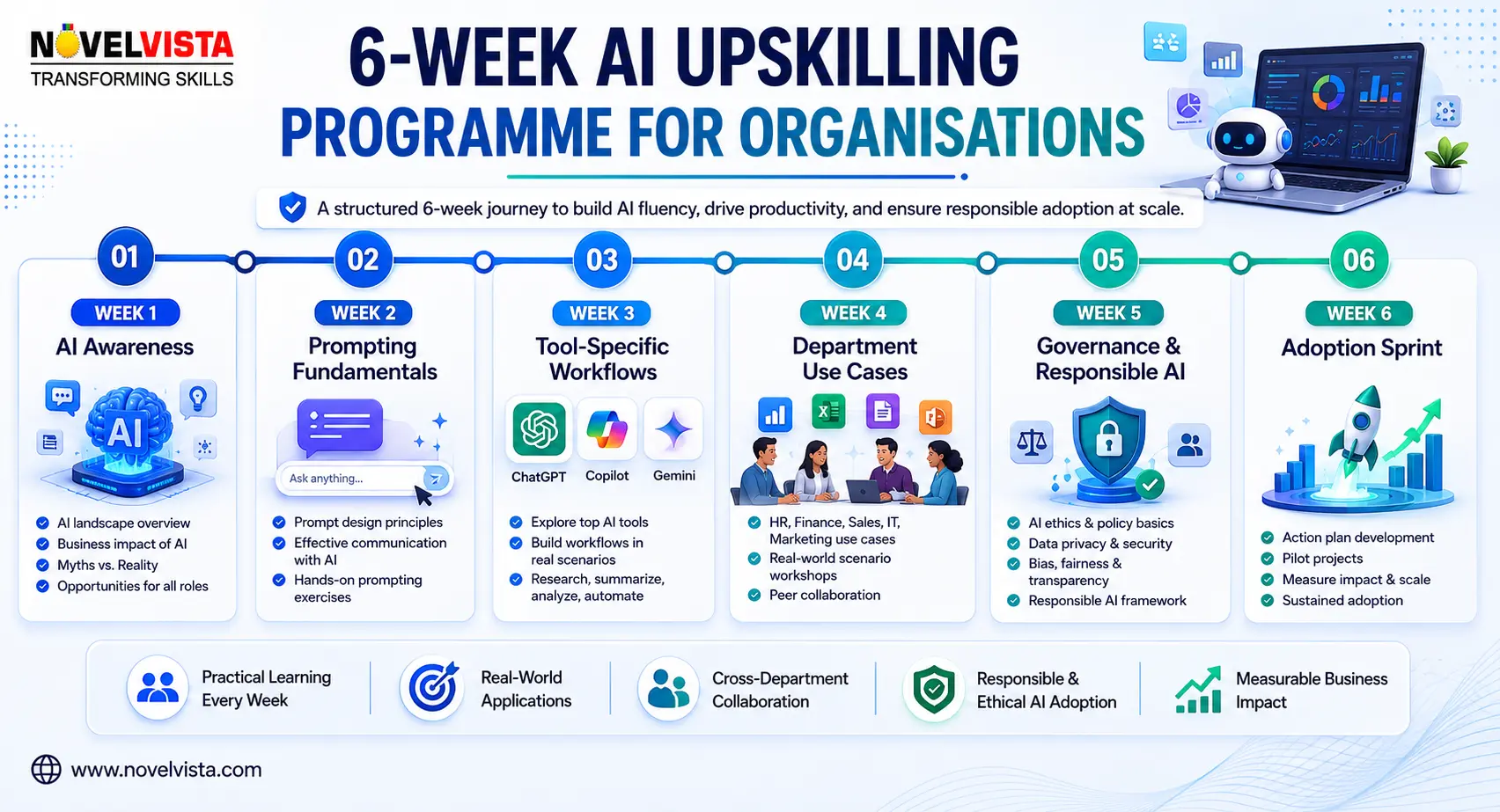
A practical AI upskilling programme for organisations can run over six weeks. The objective is to move learners from awareness to adoption, without overwhelming them with too many tools at once.
| Week | Focus Area | Learning Activity |
|---|---|---|
| Week 1 | AI Awareness | Understand ChatGPT, Copilot, Gemini, use cases, and limitations |
| Week 2 | Prompting Fundamentals | Learn task prompts, role prompts, context prompts, and review prompts |
| Week 3 | Tool-Specific Workflows | Hands-on labs for ChatGPT, Microsoft Copilot, and Gemini |
| Week 4 | Department Use Cases | Apply AI to sales, HR, finance, IT, marketing, and operations tasks |
| Week 5 | Governance and Responsible AI | Cover data privacy, verification, hallucination checks, and review rules |
| Week 6 | Adoption Sprint | Present use cases, select champions, and define productivity metrics |
This format helps organisations upskill employees on AI tools in a phased, measurable, and business-friendly way.
No corporate AI tools training initiative should ignore governance. AI can increase productivity, but careless usage can expose confidential data, create inaccurate outputs, and weaken trust.
Employees should clearly understand:
Corporate AI tools training should also explain responsible AI principles such as privacy, fairness, transparency, accuracy, accountability, and human supervision.
For IT and compliance teams, this is where enterprise AI training for employees becomes a risk-control mechanism, not just a productivity initiative.
The success of corporate AI tools training should not be measured only by attendance. A better measurement model looks at adoption, workflow impact, confidence, quality, and governance compliance.
Useful metrics include:
For 50 employees, tracking can be lightweight. For 500 employees, organisations should use dashboards by cohort, department, tool, and adoption maturity.
This is where corporate AI tools training becomes visible to leadership as a measurable workforce transformation initiative.
Many organisations invest in corporate AI tools training but fail to scale because the programme is too generic. A single session called “Introduction to AI” may create awareness, but it rarely changes day-to-day behaviour.
Avoid these mistakes:
The best AI tools training for corporate teams combines hands-on practice, role-based workflows, governance, measurement, and reinforcement.
Corporate AI tools training is now essential for organisations that want employees to use ChatGPT, Copilot, and Gemini with confidence. Whether the target group is 50 employees or 500, the most successful programmes are role-based, practical, secure, and measurable.
The right approach helps teams draft faster, analyse better, summarise smarter, create stronger presentations, improve meetings, and reduce repetitive work. More importantly, it helps employees understand when to use AI, when to verify output, and when human judgement must remain in control.
If your organisation wants a structured way to build multi-tool AI capability, explore NovelVista’s AI Tools Mastery — Multi-Tool Practitioner course. The course is designed to help teams build practical skills across ChatGPT, Copilot, Gemini, and business-focused AI workflows.
With the right corporate AI tools training, your workforce can move from casual AI usage to confident, responsible, and measurable adoption.
Author Details

Confused About Certification?
Get Free Consultation Call
Stay ahead of the curve by tapping into the latest emerging trends and transforming your subscription into a powerful resource. Maximize every feature, unlock exclusive benefits, and ensure you're always one step ahead in your journey to success.