Category | CLOUD and AWS
Last Updated On 16/04/2026
You pick an instance, deploy your app, and everything works. But after a few days, something feels off. Either your AWS bill is higher than expected, or your application slows down under load. That’s where most teams get stuck with AWS EC2 Instance Types.
The issue isn’t EC2 itself; it’s choosing the wrong combination of type, size, and pricing model. And the impact adds up quickly. Across EC2 optimization workshops, we observe 20–30% cost inefficiency in initial deployments, primarily due to incorrect instance family selection and overestimated sizing assumptions.
In this guide, we’ll break down AWS EC2 Instance Types, explain how AWS EC2 Instance Sizes actually work, and help you make smarter decisions without trial and error.
| Area | What You Should Do |
| Instance Types | Match the instance family to your bottleneck (CPU, memory, storage, or GPU) |
| Instance Sizes | Start small → monitor → scale based on real usage |
| Pricing Models | Mix On-Demand, Spot, and Savings Plans strategically |
| Default Starting Point | Use T4g or M7g for most general workloads |
| Biggest Optimization | Use Graviton-based instances for better cost-performance |
Before jumping into sizes or pricing, you need to understand one thing clearly: Not all AWS EC2 Instance Types are built the same.
Each family is designed for a specific workload pattern. If you choose the wrong family, no amount of scaling will fully fix performance or cost issues.
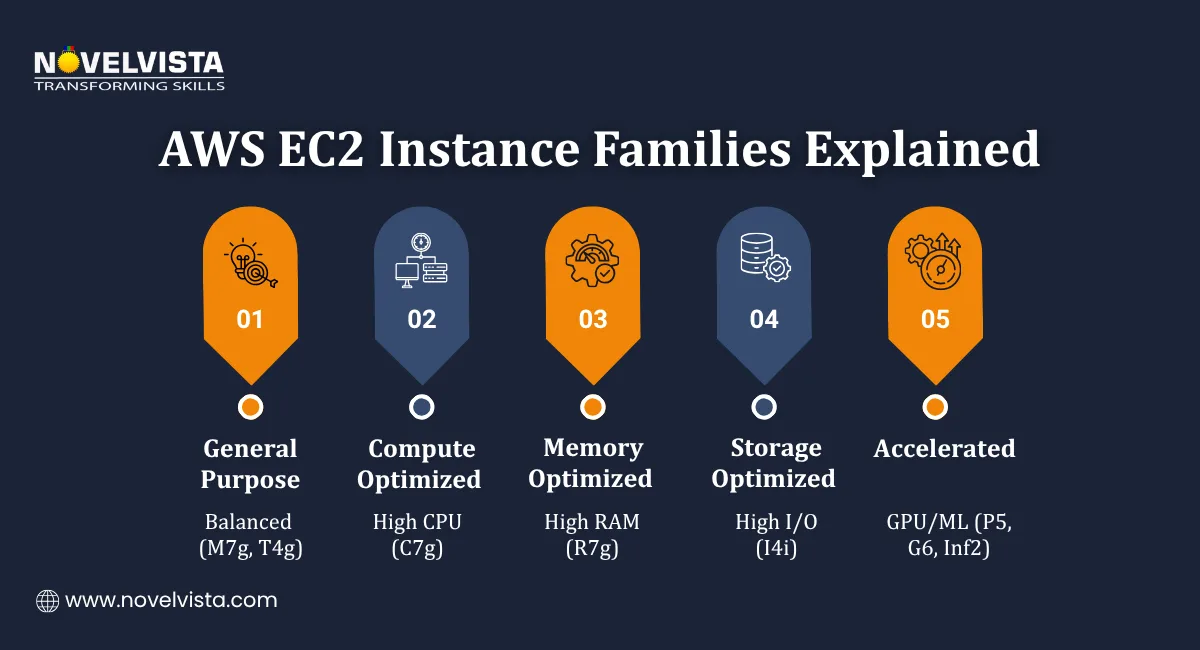
These are the most commonly used AWS EC2 Instance Types, especially when workloads don’t have extreme requirements.
They provide a balance of:
A. M7g – Stable, Everyday Workloads
Best suited for:
Why teams prefer it:
If you’re unsure where to start, M7g is usually a safe and reliable choice.
B. T4g – Cost-Efficient Burstable Instances
Best suited for:
How it works:
This makes it ideal for workloads that are:
When to Choose General Purpose
Use these AWS EC2 Instance Types when:
Some applications push CPU usage constantly. In those cases, general-purpose instances won’t be enough.
That’s where compute-focused AWS EC2 Instance Types come in.
A. C7g – High CPU Performance
Best suited for:
Key benefits:
When to Choose Compute Optimized
Go for C7g if:
When your application relies heavily on memory, increasing CPU speed won’t help much. That’s where memory-focused AWS EC2 Instance Types are useful. In database optimization scenarios, shifting to memory-optimized instances reduces query latency by 20–35% when datasets exceed available cache capacity on general-purpose instances.
A. R7g – High Memory Capacity
Best suited for:
Why it matters:
When to Choose Memory Optimized
Choose R7g if:
Sometimes the issue is not CPU or memory, it’s disk performance. For such cases, storage-focused AWS EC2 Instance Types are the right fit.
A. I4i – Fast NVMe Storage
Best suited for:
Key features:
When to Choose Storage Optimized
Use I4i when:
These are specialized AWS EC2 Instance Types designed for advanced workloads.
A. P5 – Deep Learning Training
Best suited for:
B. G6 – GPU-Based Processing
Best suited for:
C. Inf2 – Cost-Efficient AI Inference
Best suited for:
When to Choose Accelerated Instances
Use these when:
In ML training environments, selecting appropriate GPU-backed instances improves training efficiency by 40–60%, especially when aligned with workload parallelization and batch sizing strategies.
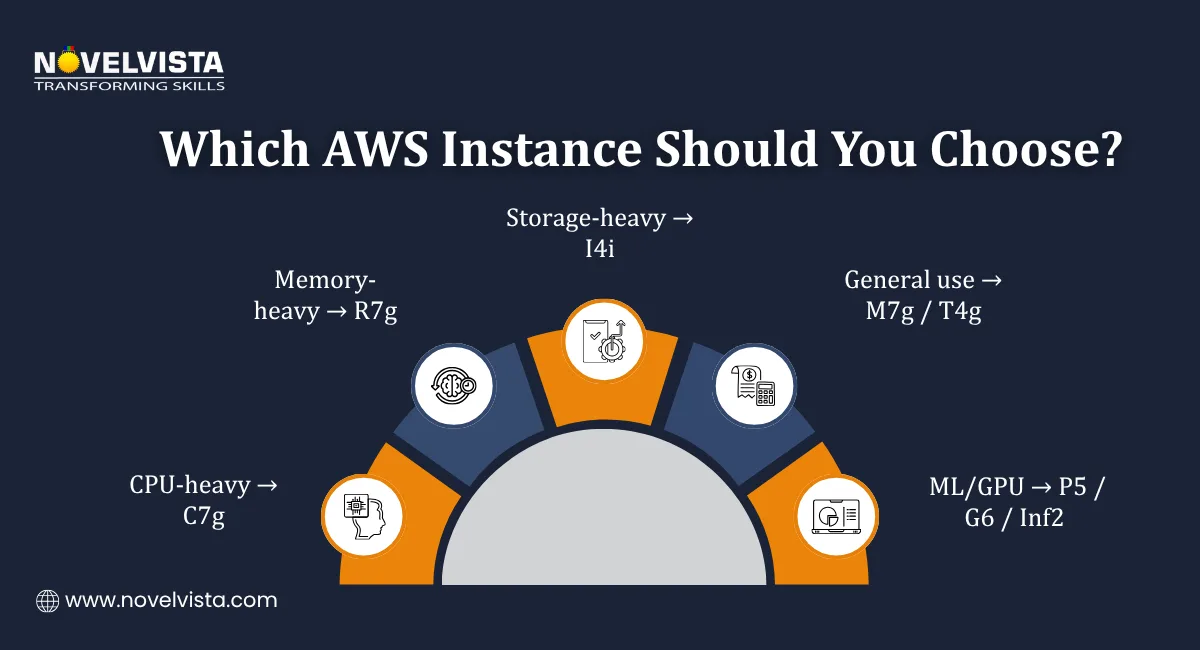
Instead of overthinking, use this shortcut:
This simple logic makes choosing AWS EC2 Instance Types much easier.
Once you pick the right instance type, the next step is choosing the right size.
This is where many teams overspend.
AWS EC2 Instance Sizes define how much computing power your instance actually gets.
Each instance family comes in multiple sizes. As you move up:
This gives you flexibility to match your workload precisely.
Size | vCPUs | Memory | Use Case |
| nano/micro | 2–4 | 0.5–1 GiB | Testing, lightweight apps |
| small/medium | 2–4 | 2–8 GiB | Web apps, dev environments |
| large/xlarge | 8–16 | 16–64 GiB | Production workloads |
| 2xlarge+/metal | 32–128 | 128–512 GiB | AI, big data, HPC |
Choosing AWS EC2 Instance Sizes is not about picking the biggest option; it’s about picking the right one.
3.1 Start Small, Then Scale
This approach reduces unnecessary cost.
3.2 Use Real Metrics (CloudWatch)
Track:
If your CPU stays under 20–30% consistently, you’re likely overpaying.
3.3 Avoid Over-Provisioning
Common mistake:
Better approach:
3.4 Understand Bare Metal (metal)
Metal instances:
Used for:
3.5 Simple Sizing Rule
Measure first → scale later
That’s the smartest way to manage AWS EC2 Instance Sizes.
Once you’ve selected the right AWS EC2 Instance Types and understood AWS EC2 Instance Sizes, the next big decision is pricing. This is where most cost optimization happens.
AWS does not follow a single pricing model. Instead, it gives you multiple options based on how predictable your workload is.
Let’s break down AWS EC2 Instance Pricing in a practical way.
This is the simplest pricing model. You pay only for what you use with no long-term commitment.
Key Features
Example:
Training participants typically use On-Demand pricing during initial deployment phases, transitioning within 4–6 weeks to more cost-efficient models after workload stabilization.
When to Use On-Demand
Trade-Off
Use this as a starting point, not a long-term solution.
Spot Instances let you use unused AWS capacity at huge discounts. You can save up to 90% compared to On-Demand pricing.
Key Features
AWS can reclaim these instances with a 2-minute warning.
When to Use Spot Instances
Trade-Off
Best used as part of a hybrid pricing strategy.
If your workload is stable, this is where real savings come in. You commit to usage for 1 or 3 years and get discounts of up to 72%.
Reserved Instances
Savings Plans
When to Use
Trade-Off
Ideal for your baseline workload.
This is a special pricing model for T4g instances.
How It Works
Extra cost:
When to Use
Why It Matters
You get flexibility without fully upgrading to a bigger instance.
Choose the best AWS EC2 instance using a practical selector guide that
matches workload needs, performance goals, and budget with confidence.
Now comes the most practical part. That is choosing the right instance based on your workload.
Instead of guessing, use this mapping.
| Instance Family | Best For | Example Pricing |
| T4g / M7g (General Purpose) | Web apps, dev environments | t4g.nano ~ $0.0042/hr |
| C7g (Compute Optimized) | CPU-heavy workloads | c7g.large ~ $0.0685/hr |
| R7g (Memory Optimized) | Databases, analytics | r7g.xlarge ~ $0.2523/hr |
| I4i (Storage Optimized) | High I/O workloads | i4i.large ~ $0.085/hr |
Instead of overthinking:
This is the fastest way to choose among AWS EC2 Instance Types.
Don’t rely only on assumptions. Use:
This helps you match workloads accurately.
Choosing the right pricing model is just the start. Real savings come from combining strategies.
Graviton-based AWS EC2 Instance Types (like M7g, C7g, R7g, T4g) offer:
This is one of the easiest optimizations.
Perfect for:
Savings:
Identify workloads that:
Use:
Savings:
Use CloudWatch to monitor:
If usage is low:
Best approach:
This hybrid strategy gives maximum flexibility and savings. Hybrid pricing strategies implemented during training programs consistently reduce total EC2 spend by 30–50% compared to single-model usage approaches.
Choosing the right AWS EC2 Instance Types is not just about performance; it directly affects your cost and scalability.
The right approach combines three decisions:
Start simple:
Once you apply these steps, your infrastructure becomes both efficient and cost-effective, without unnecessary complexity.

If you want to go beyond theory and confidently choose the right AWS EC2 Instance Types, pricing models, and architectures, NovelVista’s AWS Solution Architect Associate Certification Training is a great next move. The course covers real-world cloud design, cost optimization, and hands-on labs aligned with AWS best practices. It’s ideal for professionals looking to design scalable, secure, and cost-efficient cloud solutions with a practical understanding.
Author Details

Confused About Certification?
Get Free Consultation Call
Stay ahead of the curve by tapping into the latest emerging trends and transforming your subscription into a powerful resource. Maximize every feature, unlock exclusive benefits, and ensure you're always one step ahead in your journey to success.